
You need to replace Source Sans with Open Sans across a batch of PDFs.
Two similar sans-serif fonts. Same style, same weight, roughly the same proportions. Should be straightforward.
You write a script, embed Open Sans, swap the font references, run it. The output looks wrong. Lines that used to fit now overflow. A few paragraphs reflow and gain an extra line, pushing content off the page. Some characters show up as tofu — little rectangles where glyphs should be. Others turn into question marks. The letter spacing is off — some pairs are too tight, others have visible gaps where the kerning made sense for Source Sans but not for Open Sans. The bounding boxes are wrong. The line spacing changed.
Two fonts that look almost identical on screen, and yet switching from one to the other broke the layout in a dozen different ways.
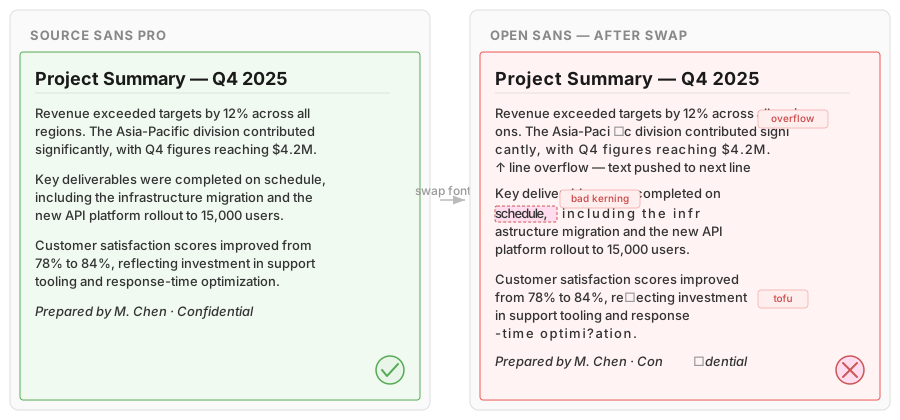
Fonts in PDF are not a style property. They are deeply wired into how every character is stored, positioned, encoded, and drawn. Changing a font — or even changing a single character in an existing font — can break text extraction, copy/paste, accessibility, spacing, and visual fidelity. All at once. Often silently.
In this article, I will take you through how fonts actually work inside PDFs, why they cause so many problems, and what it takes to handle them properly.
The zoo: font types in PDF
PDF does not have "fonts". It has five fundamentally different font technologies, accumulated over 30 years of backward compatibility.
| Type | Introduced | Outline Format | Max Glyphs | Still Common? |
|---|---|---|---|---|
| Type 1 | 1984 | PostScript (cubic) | 256 | Legacy PDFs |
| TrueType | ~1991 | Quadratic splines | 256* | Very common |
| Type 3 | 1990s | PDF drawing commands | 256 | TeX, math |
| CID (Type 0) | 1990s | Composite (Type1/TT) | 65,535 | CJK, modern |
| OpenType (CFF) | 2000s | Cubic or quadratic | 65,535 | Modern PDFs |
*TrueType in PDF is limited to 256 glyphs per encoding, unless wrapped in a CID composite font.
Each type stores its outline data differently, uses different internal structures, and has different rules for encoding, embedding, and metrics. A single PDF can contain all five types at once.
Type 1 is the original PostScript font format from 1984. Each glyph is described as a small PostScript program — a sequence of moveto, lineto, and curveto commands using cubic Bézier curves. The font file itself is partially human-readable text, partially binary (the "eexec" encrypted section that contains the actual glyph programs). Limited to 256 glyphs per encoding — enough for English, tight for German, impossible for Chinese.
Type 1 has a peculiar internal structure: the font is split into a public dictionary (font name, encoding, metrics) and a private dictionary (the encrypted glyph outlines and hint data). The private dictionary was encrypted to protect Adobe's proprietary hinting technology in the 1980s. The encryption is trivially breakable — the "secret" key has been public knowledge for decades — but the structure remains, and any parser must still decrypt it to access the glyph data.
Still found in millions of legacy PDFs, and still generated by some older tools.
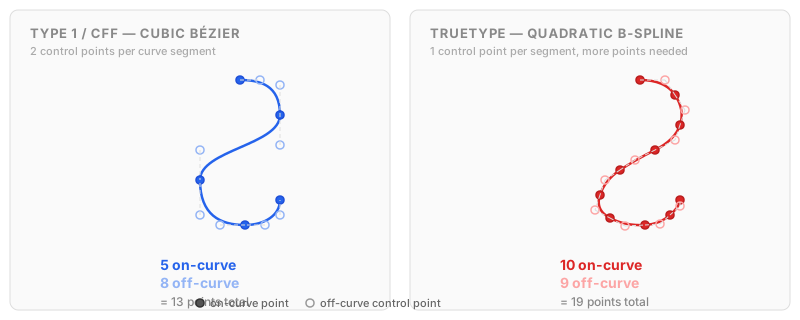
TrueType was Apple and Microsoft's answer to Type 1. Where Type 1 uses cubic Bézier curves (two control points per curve segment), TrueType uses quadratic B-splines (one control point per segment). Simpler math, more points needed for the same shape, different rasterization behavior at small sizes. Same 256-glyph limitation unless wrapped in a composite CID structure.
Internally, a TrueType font is organized as an sfnt container — a binary file format that holds a collection of named tables: glyf for glyph outlines, cmap for character mappings, hmtx for horizontal metrics, head for global font metadata, OS/2 for platform-specific metrics, and dozens more. When a PDF embeds a TrueType font, it embeds this sfnt data (or a subset of it) as a binary stream. The table structure is completely different from Type 1 — there is no PostScript program, no eexec encryption, no charstring interpreter. It is a different world.
TrueType also introduced bytecode hinting: tiny programs embedded per glyph that instruct the rasterizer how to snap outlines to the pixel grid at small sizes. Some PDF viewers execute these programs. Others ignore them entirely. Same font, different rendering.
Type 3: the strange one
Type 3 deserves its own section because it breaks every assumption about what a "font" is.
A Type 3 font does not contain outline data in any standard format. Instead, each glyph is defined as a PDF content stream — the same kind of drawing instructions used to draw the page itself. A Type 3 glyph can contain lines, curves, fills, images, transparency, color, even references to other fonts.
Here is what a Type 3 glyph definition can look like:
/a {
  0 0 d1
  q
  0.5 0 0 0.5 0 0 cm
  BT
  /F1 12 Tf
  (α) Tj
  ET
  Q
} def
This "glyph" for the character "a" actually draws a Greek alpha using another font. A font inside a font.
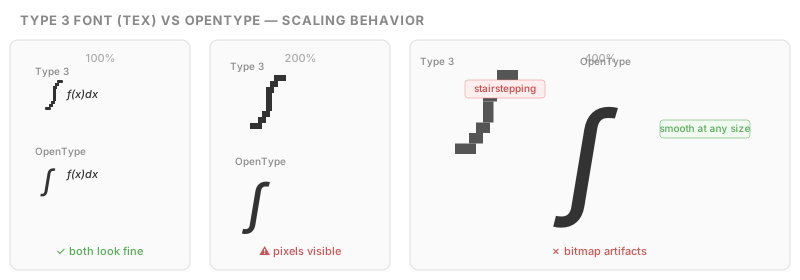
More commonly, Type 3 is used in TeX-generated PDFs for mathematical symbols. TeX's Metafont system produces glyph shapes as bitmap-like constructs, and many TeX-to-PDF converters wrap these as Type 3 fonts. The result: thousands of academic papers where every mathematical symbol is a tiny PDF drawing program instead of a proper glyph outline.
The problems with Type 3 are significant:
- No standard metrics. Glyph widths can be defined per glyph program (using the d0 or d1 operators), but there is no requirement for a consistent metrics table.
- No hinting. The rasterizer cannot optimize rendering because there are no hints to follow — it is just arbitrary drawing commands.
- Scaling artifacts. Because many Type 3 glyphs are effectively bitmaps wrapped in PDF commands, they look fine at one size and terrible at another.
- Text extraction often fails. Type 3 fonts rarely carry usable encoding or ToUnicode data. The glyph named "a" might draw anything.
- Accessibility is effectively broken. Screen readers cannot interpret arbitrary drawing commands as text.
- Most PDF libraries handle Type 3 poorly or not at all. It is the font type most likely to cause crashes, rendering errors, or silent data loss in processing tools.
If you encounter a Type 3 font in a PDF you need to edit, the most reliable strategy is often to replace it entirely with a proper font that contains the same characters.
CID and OpenType
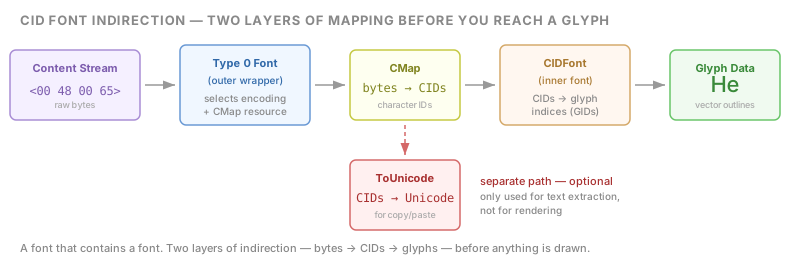
CID fonts (formally "Type 0 composite fonts") break the 256-glyph barrier by using two-byte character codes, supporting up to 65,535 glyphs. Required for Chinese, Japanese, and Korean. The internal structure is more complex: a top-level Type 0 font references a CIDFont descendant, which in turn contains the actual glyph data in either PostScript or TrueType format.
The indirection matters: you have a font that contains a font. The outer font (Type 0) handles encoding and character code mapping. The inner font (CIDFont) holds the actual glyphs. Between them sits a CMap resource that maps byte sequences from the content stream to CIDs (Character IDs), which then map to glyph indices in the inner font. Two layers of mapping before you reach the glyph.
OpenType with CFF data is the most modern variant. CFF stands for Compact Font Format — it is essentially Type 1 glyph data repackaged into a more efficient binary structure. Where a raw Type 1 font stores its outlines as a PostScript program you could technically read as text, CFF compresses the same cubic curve data into a compact binary encoding that is smaller and faster to parse. When an OpenType font contains CFF data (as opposed to TrueType outlines), the PDF embeds it as a CFF font program rather than a TrueType sfnt table — two completely different binary formats for the same purpose. On top of that, OpenType adds GPOS and GSUB tables for advanced typographic features.
The practical consequence: any code that touches fonts in a PDF must handle all of these formats. They do not share a common interface. Parsing a Type 1 font means decrypting eexec data and interpreting PostScript charstrings. Parsing TrueType means navigating sfnt tables and decoding quadratic outlines. Parsing Type 3 means executing arbitrary PDF drawing commands. Parsing CID means traversing a two-layer font-within-a-font structure. And parsing CFF means decoding yet another binary format that resembles Type 1 conceptually but looks nothing like it in practice.
Encoding: bytes are not characters
When a PDF draws text, it does not store Unicode strings. It stores bytes. Those bytes are interpreted through the font's encoding to select which glyph to draw.
Here is a simple example:
BT
/F1 12 Tf
100 700 Td
(Hello) Tj
ET
Those five bytes in (Hello) — 0x48, 0x65, 0x6C, 0x6C, 0x6F — happen to correspond to H, e, l, l, o in WinAnsi encoding. Looks straightforward.
Now consider this:
BT
/F2 12 Tf
100 700 Td
<0017002800330033003C> Tj
ET
Same word. Same visual result. But the bytes are completely different. This font uses Identity-H encoding, where each two-byte value is a raw glyph ID. 0x0017 happens to be the glyph for "H" in this specific font. In a different font, 0x0017 could be a comma, a Chinese character, or nothing at all.
PDF defines several standard encodings:
- WinAnsi — Windows Latin-1. The most common for Western text.
- MacRoman — Classic Mac OS encoding. Slightly different character set.
- StandardEncoding — The PDF default for simple fonts. Not ASCII.
- Identity-H / Identity-V — Raw glyph IDs. No inherent meaning.
And fonts can define custom encodings on top of these, remapping individual byte values through a /Differences array.
The result: the same byte can mean different things depending on which font it belongs to, which encoding that font uses, and whether the encoding has been modified. There is no universal lookup table.
This is why "find and replace" in a PDF is not a string operation. You cannot search for the bytes "Hello" across fonts. You must decode through each font's specific encoding first, and that encoding might be incomplete, custom, or undocumented.
Subsetting: the font is incomplete by design
Most PDFs do not embed complete fonts. They embed subsets — stripped-down copies containing only the glyphs that actually appear in the document.
A full font file for a common typeface might be 200–500 KB. A CJK font can be 10–20 MB. Multiply that by every font in the document and file sizes would explode.
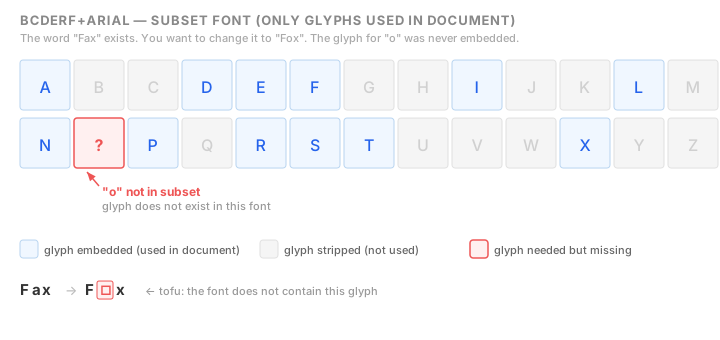
So PDF generators strip out everything that is not needed. If the document never uses the letter "Q", the glyph for "Q" is not in the file.
You can spot subset fonts by their names. The PDF spec requires subset fonts to be prefixed with a six-letter tag:
ABCDEF+Arial-Bold
GHIJKL+TimesNewRoman
MNOPQR+Helvetica
The tag is random. It tells you nothing useful. It just signals: this font is incomplete.
For viewing, this is fine. The PDF only draws glyphs that exist in the subset, so it always looks correct.
For editing, it is a trap.
Want to change "Fax" to "Fox"? If the letter "o" was never used in that font in the document, the glyph for "o" is not in the subset. It does not exist. You cannot draw it. The font literally does not know what an "o" looks like.
Your options:
- extend the subset by injecting the missing glyph from the original full font (if you can find it)
- substitute a different font entirely (and deal with the metric differences)
- give up
The first option sounds reasonable, but it requires access to the original font file, which is often not available. The PDF only contains the subset. The original might be a commercial font that is not on your system. Even if you find the original, the internal glyph IDs, encoding tables, and width arrays must be updated consistently or the result will be broken in subtle ways.
Glyph widths: why spacing breaks
Every font in a PDF carries a width table: a mapping from each glyph (or character code) to its advance width — the horizontal distance the cursor moves after drawing that glyph.
For simple fonts, this is a /Widths array:
/Widths [278 0 0 0 0 0 0 0 333 333 0 0 278 333 278 278
         556 556 556 556 556 556 556 556 556 556 278 278]
Each number is the width of one character code, in units of 1/1000 of the font size.
For CID fonts, the structure is different — a sparse /W array:
/W [120 [500 600 700] 200 300 450]This means: CID 120 has width 500, CID 121 has width 600, CID 122 has width 700, and CIDs 200 through 300 each have width 450.
The width table is the source of truth for text layout in PDF. It determines where every character sits relative to every other character.
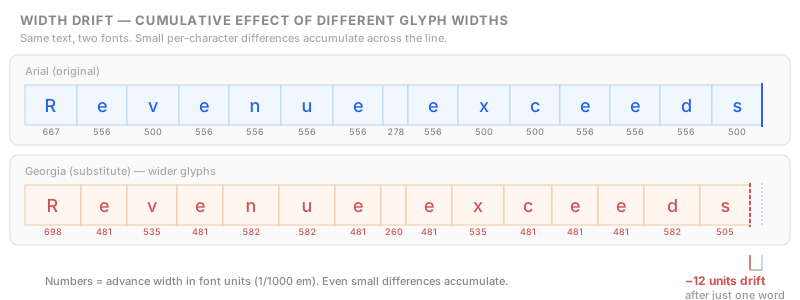
Here is the problem: these widths come from the font at the time the PDF was created. They are baked in. If you substitute a different font, the new font almost certainly has different widths for the same characters.
Example:
- Arial "W" advance width: 722
- Helvetica "W" advance width: 722 (close match, same metric origin)
- Times New Roman "W" advance width: 722
- Georgia "W" advance width: 700
Those 22 units of difference on a single character might seem tiny. But multiply it across a full line of text, and letters start to drift. Words overlap or leave gaps. Justified text falls apart.
And this is for a single character in closely related fonts. Switch from a proportional font to a monospaced one, or between serif and sans-serif, and the cumulative drift can be catastrophic.
Kerning and what PDF throws away
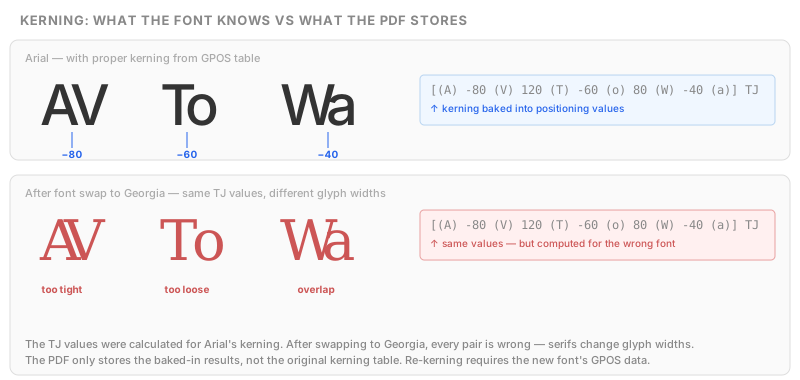
In a word processor, fonts have kerning tables — lookup tables that adjust the spacing between specific character pairs. "AV" is pulled closer together. "To" is tightened. These pair-specific adjustments are what make professionally typeset text look good.
Modern OpenType fonts go much further with GPOS (Glyph Positioning) and GSUB (Glyph Substitution) tables:
- GPOS handles pair kerning, but also mark positioning (placing accents), cursive attachment (connecting Arabic letters), and context-dependent adjustments.
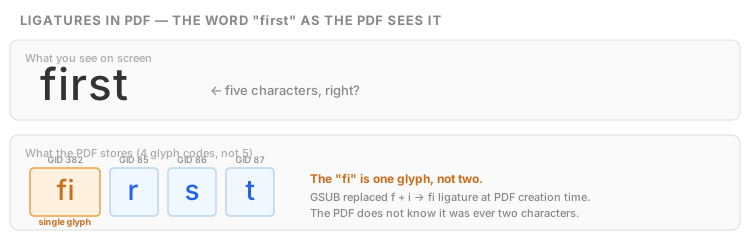
- GSUB handles ligatures (fi, fl, ffi → single glyph), contextual alternates, small caps, old-style figures, and script-specific shaping.
PDF throws almost all of this away.
When a PDF is generated, the creating application applies the kerning and shaping rules and writes the result as explicit glyph positions in the content stream. The GPOS and GSUB tables themselves are not preserved in the PDF.
You see this in the TJ operator:
[(H) -30 (e) 20 (l) 10 (l) -15 (o)] TJThose numbers between the glyph strings (−30, 20, 10, −15) are manual spacing adjustments in thousandths of a unit of text space. They are the result of kerning, already baked into the stream. The original kerning table is gone.
For viewing, this is fine. The text looks perfect.
For editing, it means:
- If you change a character, you lose the kerning adjustment that was calculated for the original pair.
- If you substitute a font, every one of those manual adjustments is wrong because they were computed for a different font's metrics.
- You cannot "re-kern" from the PDF alone, because the kerning data is not in the file. You need the original font with its GPOS table.
The same applies to ligatures. If the original font replaced "fi" with a single ligature glyph, that ligature is what the PDF stores. The PDF does not know it was once two characters. If you need to edit the word "first", you are not editing five characters. You are editing four: [fi-ligature] [r] [s] [t].
The Unicode mapping problem
So far we have established that PDF stores bytes, not characters. But something has to bridge the gap, or copy/paste would never work. That bridge is ToUnicode.
A ToUnicode CMap is a mapping table embedded in the PDF that says: "glyph code X corresponds to Unicode character U+YYYY."
beginbfchar
<0017> <0048>
<0028> <0065>
<0033> <006C>
<003C> <006F>
endbfchar
This tells any reader: when you encounter glyph 0x0017, the Unicode character is U+0048 (H). This is what makes text selectable, searchable, and accessible.
The problem: ToUnicode is optional.
In the real world:
- Many PDF generators skip it entirely, especially older ones and print pipelines.
- Some write incomplete mappings that cover common characters but miss symbols, ligatures, or accented characters.
- Some write incorrect mappings — the text looks fine visually but copy/paste produces garbage.
- And some deliberately scramble the mapping as a form of copy protection.
Without a correct ToUnicode, you cannot reliably determine what text a PDF contains, which means you cannot reliably search, extract, or edit it.
The reverse direction is even worse. Even with a perfect ToUnicode, going from Unicode back to glyph codes is not guaranteed to work. ToUnicode is a forward mapping (glyph → Unicode). The reverse mapping (Unicode → glyph) requires the font's encoding tables, which may use custom encodings, multi-byte schemes, or Identity-H where the only way to find the right glyph code is to have the full font's cmap table.
This is the core font problem for any PDF editing tool: you must decode text to understand it, but then re-encode it to write it back, and the two directions use different data that may not be consistent.
Font substitution: what goes wrong
When a font is not embedded (or not fully embedded) and not available on the system, the PDF viewer substitutes a fallback. This is where things get visibly ugly.
Adobe Acrobat uses a pair of Multiple Master fonts (AdobeSerifMM, AdobeSansMM) as universal fallbacks. They can stretch and compress to approximate the original metrics. The result is usually readable but never pretty — a kind of uncanny valley of typography.
Other viewers (Chrome, Firefox, Edge, Preview.app) use system fonts as substitutes. Each viewer has its own heuristics. The same PDF with a missing font will look different in every application.
The substitution algorithm typically tries to match:
- Exact font name
- PostScript name
- Family name with style (bold, italic)
- Serif/sans-serif classification
- Generic fallback
But font names are not standardized. A font might be called "ArialMT" in one PDF, "Arial-BoldMT" in another, and "BCDERF+Arial,Bold" in a third. The same font, three different strings, and a substitution algorithm that may or may not recognize them as the same thing.
And even when the right substitute is found, the metrics are usually wrong. Character widths, ascender/descender heights, and baseline positions differ. The text reflows. Lines break at different points. Paragraphs grow or shrink.
The Base 14 assumption
PDF defines 14 "standard" fonts that every viewer is supposed to support without embedding:
Times-Roman, Times-Bold, Times-Italic, Times-BoldItalic, Helvetica, Helvetica-Bold, Helvetica-Oblique, Helvetica-BoldOblique, Courier, Courier-Bold, Courier-Oblique, Courier-BoldOblique, Symbol, ZapfDingbats.
The idea: if you use these fonts, you do not need to embed them. Every PDF reader will have them.
The reality: "Helvetica" on macOS is not the same Helvetica as on Windows (which substitutes Arial). The metrics are close but not identical. Symbol and ZapfDingbats have special encodings that are handled inconsistently across viewers.
Modern best practice (and PDF/A requirement) is to embed everything, including the Base 14. But millions of existing PDFs rely on the assumption that these fonts exist and look the same everywhere. They do not.
What happens with non-Latin scripts
Everything described above applies to Latin text with relatively simple fonts. For non-Latin scripts, font handling in PDF becomes dramatically harder.
CJK (Chinese, Japanese, Korean): Thousands of glyphs. CID fonts mandatory. Viewer must have the right font pack installed (Adobe Reader prompts you to download Asian font packs separately). Subset fonts are huge. Encoding systems are mutually incompatible across regions.
Arabic and Hebrew: Right-to-left text. Bidirectional mixing with Latin text. Arabic has four glyph forms per character (initial, medial, final, isolated). Shaping must happen at PDF creation time because the PDF only stores the final glyph forms. If the shaping was wrong, it cannot be fixed without the original text and a proper shaping engine.
Devanagari, Thai, Khmer, and other complex scripts: Consonant clusters, stacking characters, context-dependent glyph selection. Requires sophisticated shaping engines (like HarfBuzz) at creation time. The PDF stores only the shaped result. Many PDF libraries handle these incorrectly or not at all.
The common pattern: the PDF stores the visual result of complex shaping, but not the shaping rules. Editing means re-shaping, which requires understanding the script, having the right font with the right GSUB/GPOS tables, and running the right shaping algorithm.
Putting it all together
Let's say you need to change the font in one paragraph of a real-world PDF from Arial to Calibri.
Here is what actually has to happen:
- Identify the text. Walk the content stream. Decode bytes through Arial's encoding. Reconstruct words from potentially scattered glyphs (the CID soup problem from the previous deep dive).
- Check the target font. Does Calibri contain glyphs for every character in the paragraph? Including ligatures, accented characters, and any special symbols? If the font is not embedded, you need to find and embed it.
- Re-encode. Map each Unicode character back to the correct glyph code in Calibri's encoding. This encoding may be completely different from Arial's.
- Recalculate widths. Every glyph has a different advance width in Calibri. Update the
/Widthsarray and the actual glyph positions in the content stream. - Re-kern. The original TJ micro-positioning was calculated for Arial's metrics. All of it is wrong now. You need Calibri's kerning data (from GPOS) to recalculate pair adjustments.
- Update metrics metadata. The font descriptor in the PDF stores ascent, descent, cap height, and bounding box values. These must match the new font, or clipping and line spacing will break.
- Handle the subset. Create a proper subset of Calibri containing exactly the glyphs used. Update the subset tag. Write correct CIDToGIDMap if needed.
- Write ToUnicode. Generate a correct ToUnicode CMap for the new font so copy/paste and accessibility continue to work.
- Verify transforms. If the text is under a transformation matrix, the new metrics must account for scaling, rotation, or skew.
Skip any of these steps and the result will be subtly (or obviously) broken.
This is not theoretical. This is what "change the font" means at the PDF level. Every step has edge cases. Every edge case is common in real-world documents.
The solution: font-aware semantic editing
The only reliable approach is to treat font changes as a semantic operation, not a byte-level substitution.
That means:
- building a full model of what the page draws: every glyph, its position, its font, its encoding
- understanding which glyphs form words, which words form lines, which lines form paragraphs
- analyzing the font's metrics, encoding, and glyph coverage
- applying the font change in the semantic model (not in raw bytes)
- re-laying out the affected text with the new font's metrics, kerning, and width tables
- re-encoding back to the content stream with correct glyph codes, widths, and positioning
- writing correct metadata: font descriptors, width arrays, ToUnicode, subset
This is fundamentally different from "find bytes, swap bytes." It requires understanding both the source font and the target font deeply enough to translate between them while preserving visual fidelity.
Try it
I built PDFDancer to handle fonts properly — understanding the full encoding chain, managing subsets, recalculating metrics, and preserving layout when fonts change.
You can try it with the free tier — no credit card required.
Fonts in PDF are hard because the format was designed to draw text, not to describe it. Every font is its own little world of encodings, metrics, and glyph mappings. The moment you need to change anything, you are translating between worlds. The only question is whether your tool understands that or pretends it is simpler than it is.